
Dodge Charger: Head Restraints / Front Head Restraint Removal
Dodge Charger 2011-2026 Owner's Manual / GETTING TO KNOW YOUR VEHICLE / SEATS / Head Restraints / Front Head Restraint Removal
To remove the head restraint, raise it up as far as it can go. Then, push the adjustment button and the release button at the base of each post while pulling the head restraint up. To reinstall the head restraint, put the head restraint posts into the holes. Then, adjust it to the appropriate height.
https://ecufix.infoNOTE:
Do not reposition the head restraint 180 degrees to the incorrect position in an attempt to gain additional clearance to the back of the head.
WARNING!
- A loose head restraint thrown forward in a collision or hard stop could cause serious injury or death to occupants of the vehicle. Always securely stow removed head restraints in a location outside the occu- pant compartment.
- ALL the head restraints MUST be rein- stalled in the vehicle to properly protect the occupants. Follow the re-installation instructions above prior to operating the vehicle or occupying a seat.
 Rear Head Restraints
The center head restraint has two adjustable positions: up or down. When the
center seat is being occupied, the head restraint should be in the raised position...
 MIRRORS
..
Other information:
Dodge Charger 2011-2026 Owner's Manual: Sealing A Tire With Tire Service Kit
(A) Whenever You Stop To Use Tire Service Kit: Pull over to a safe location and turn on the vehicle’s Hazard Warning flashers. Verify that the valve stem (on the wheel with the deflated tire) is in a position that is near to the ground. This will allow the Tire Service Kit Hoses (4) and (8) to reach the valve stem and keep the Tire Service Kit flat on the ground...
Dodge Charger 2011-2026 Owner's Manual: Tire Loading And Tire Pressure
NOTE: The proper cold tire inflation pressure is listed on the driver’s side B-pillar or the rear edge of the driver's side door. Check the inflation pressure of each tire, including the spare tire (if equipped), at least monthly and inflate to the recommended pressure for your vehicle...
Categories
- Manuals Home
- Dodge Charger Owners Manual
- Dodge Charger Service Manual
- How To Use Remote Start
- ELECTRIC POWER STEERING
- SERVICING AND MAINTENANCE
- New on site
- Most important about car
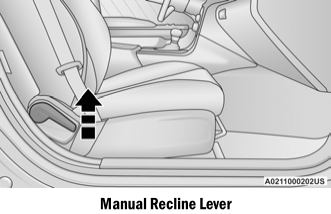
Manual Front Seat Recline
To adjust the seatback, lift the lever located on the outboard side of the seat, lean back to the desired position and release the lever. To return the seatback, lift the lever, lean forward and release the lever.

Copyright © 2026 www.docharger.org