
Dodge Charger: GETTING TO KNOW YOUR INSTRUMENT PANEL / INSTRUMENT CLUSTER
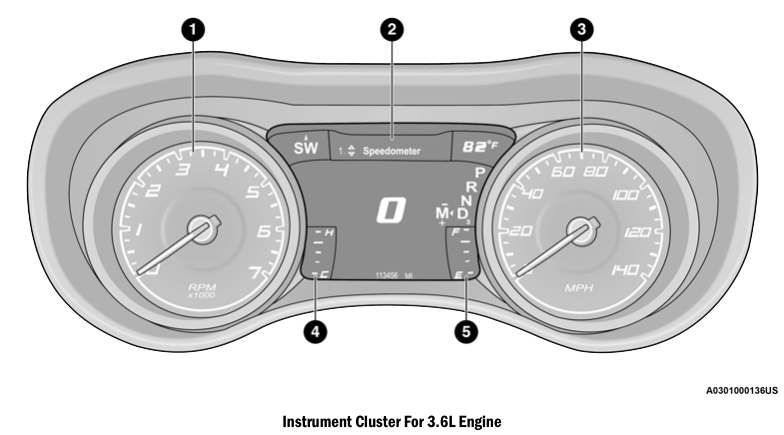
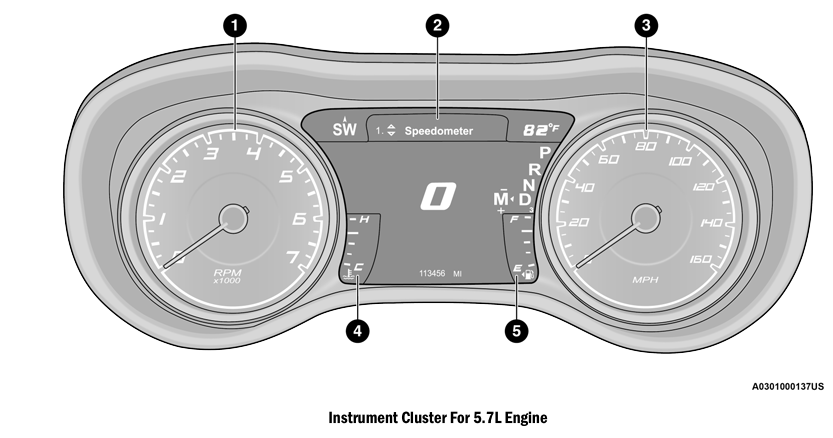
INSTRUMENT CLUSTER DESCRIPTIONS
- Tachometer
- Indicates the engine speed in revolutions per minute (RPM x 1000).
- Instrument Cluster Display
- When the appropriate conditions exist, this display shows the instrument cluster display messages.
- Speedometer
- Indicates vehicle speed.
- Temperature Gauge
- The temperature gauge shows engine coolant temperature. Any reading within the normal range indicates that the engine cooling system is operating satis- factorily.
- The gauge pointer will likely indicate a higher temperature when driving in hot weather, up mountain grades, or when towing a trailer. It should not be allowed to exceed the upper limits of the normal operating range.
WARNING!
A hot engine cooling system is dangerous. You or others could be badly burned by steam or boiling coolant. You may want to call an authorized dealer for service if your vehicle overheats. If you decide to look under the hood yourself, follow the warnings under Cooling System.
CAUTION!
Driving with a hot engine cooling system could damage your vehicle. If the temperature gauge reads “H” pull over and stop the vehicle. Idle the vehicle with the air conditioner turned off until the pointer drops back into the normal range. If the pointer remains on the “H”, turn the engine off immediately and call an authorized dealer for service.
- Fuel Gauge
- The pointer shows the level of fuel in the fuel tank when the Keyless
Push Button Ignition is in the ON/RUN position.
 The fuel pump symbol
points to the side of the vehicle where the fuel door is located.
The fuel pump symbol
points to the side of the vehicle where the fuel door is located.
NOTE:
The hard telltales will illuminate for a bulb check when the ignition is first cycled.
- The pointer shows the level of fuel in the fuel tank when the Keyless
Push Button Ignition is in the ON/RUN position.

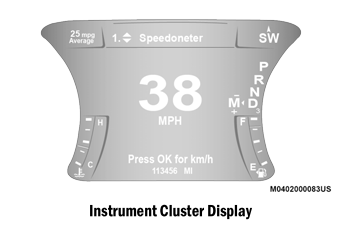
 INSTRUMENT CLUSTER DISPLAY
Your vehicle is equipped with an instrument cluster display, which offers useful
information to the driver. With the ignition in the OFF mode, opening/closing of
a door will activate the display for viewing, and display the total miles, or kilometers,
in the odometer...
Other information:
Dodge Charger 2011-2026 Owner's Manual: Rear Head Restraints
The center head restraint has two adjustable positions: up or down. When the center seat is being occupied, the head restraint should be in the raised position. When there are no occupants in the center seat, the head restraint can be lowered for maximum visibility for the driver...
Dodge Charger 2011-2026 Owner's Manual: GENERAL INFORMATION
The following regulatory statement applies to all Radio Frequency (RF) devices equipped in this vehicle: This device complies with Part 15 of the FCC Rules and with Innovation, Science and Economic Development Canada license-exempt RSS standard(s)...
Categories
- Manuals Home
- Dodge Charger Owners Manual
- Dodge Charger Service Manual
- USB/AUX Control
- Service Tire Pressure System Warning
- WHEEL AND TIRE TORQUE SPECIFICATIONS
- New on site
- Most important about car
Power Door Locks
The power door lock switches are located on each front door panel. Push the switch to lock or unlock the doors.
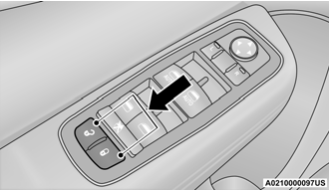
The driver’s door will unlock automatically if the keys are found inside the vehicle when the door lock button on the front door panel is used to lock the door. This will occur for two attempts. Upon the third attempt, the doors will lock even if the key is inside.
