
Dodge Charger: EXTERIOR LIGHTS / Parking Lights
Dodge Charger 2011-2026 Owner's Manual / GETTING TO KNOW YOUR VEHICLE / EXTERIOR LIGHTS / Parking Lights
To turn on the parking lights and instrument panel lights, rotate the headlight switch clockwise. To turn off the parking lights, rotate the headlight switch back to the O (off) position.
NOTE:
For vehicles sold in Canada, rotate the head- light switch to the AUTO position to turn off the parking lights.
 Automatic Headlights
This system automatically turns the headlights on or off according to ambient
light levels. To turn the system on, rotate the headlight switch counterclockwise
to the AUTO position...
 Automatic Headlights On With Wipers — If Equipped
If your vehicle is equipped with Automatic Headlights, it also has this customer-programmable
feature. When your headlights are in the automatic mode and the engine is running,
they will automatically turn on when the wiper system is on...
Other information:
Dodge Charger 2011-2026 Owner's Manual: REFUELING THE VEHICLE
Put the vehicle in PARK and switch the ignition off. Push near the rear edge and center of the of the fuel filler door to release. The door will pop open to allow hand access to open the door the rest of the way. Open the fuel filler door...
Dodge Charger 2011-2026 Owner's Manual: AutoPark
AutoPark is a supplemental feature to assist in placing the vehicle in PARK should the situations on the following pages occur. It is a back up system and should not be relied upon as the primary method by which the driver shifts the vehicle into PARK...
Categories
- Manuals Home
- Dodge Charger Owners Manual
- Dodge Charger Service Manual
- ELECTRIC POWER STEERING
- SCHEDULED SERVICING
- How To Use Remote Start
- New on site
- Most important about car
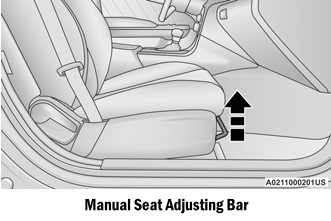
Manual Front Seat Forward/Rearward Adjustment
Some models may be equipped with a manual front passenger seat. The seat can be adjusted forward or rearward by using a bar located by the front of the seat cushion, near the floor.

Copyright © 2026 www.docharger.org