
Dodge Charger: EXTERIOR LIGHTS / Turn Signals
Dodge Charger 2011-2026 Owner's Manual / GETTING TO KNOW YOUR VEHICLE / EXTERIOR LIGHTS / Turn Signals
Move the multifunction lever up or down to activate the turn signals. The arrows on each side of the instrument cluster flash to show proper operation.
NOTE:
If either light remains on and does not flash, or there is a very fast flash rate, check for a defec- tive outside light bulb.
 Headlight Delay, Lights-On Reminder, Fog Lights
Headlight Delay
To aid in your exit, your vehicle is equipped with a headlight delay that will
leave the headlights on for approximately 90 seconds...
 Lane Change Assist — If Equipped
Lightly push the multifunction lever up or down, without moving beyond the detent,
and the turn signal will flash three times then automatically turn off...
Other information:
Dodge Charger 2011-2026 Owner's Manual: Air Conditioner Maintenance
For best possible performance, your air conditioner should be checked and serviced by an authorized dealer at the start of each warm season. This service should include cleaning of the condenser fins and a performance test. Drive belt tension should also be checked at this time...
Dodge Charger 2011-2026 Owner's Manual: To Activate/Deactivate
Push and release the Adaptive Cruise Control (ACC) on/off button. The ACC menu in the instrument cluster displays “ACC Ready.” To turn the system off, push and release the Adaptive Cruise Control (ACC) on/off button again. At this time, the system will turn off and the instrument cluster displays “Adaptive Cruise Control (ACC) Off...
Categories
- Manuals Home
- Dodge Charger Owners Manual
- Dodge Charger Service Manual
- Launch Control
- WHEEL AND TIRE TORQUE SPECIFICATIONS
- How To Use Remote Start
- New on site
- Most important about car
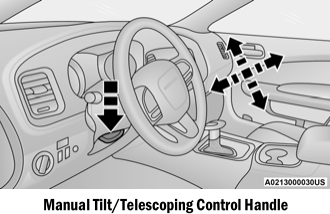
Manual Tilt/Telescoping Steering Column — If Equipped
This feature allows you to tilt the steering column upward or downward. It also allows you to lengthen or shorten the steering column. The tilt/telescoping control is located below the steering wheel at the end of the steering column.

Copyright © 2026 www.docharger.org