Dodge Charger: WINDOWS / Automatic Window Features
Auto-Down Feature
The driver and front passenger door power window switches have an Auto-Down feature. Push the window switch down to the second detent, release, and the window will go down automatically.
To stop the window from going all the way down during the Auto-Down operation, pull up or push down on the switch briefly.
https://ecufix.infoAuto-Up Feature With Anti-Pinch Protection
Pull the window switch up to the second detent and the window will go up automatically.
To stop the window from going all the way up during the Auto-Up operation, push down on the switch briefly.
To close the window part way, lift the window switch briefly and release it when you want the window to stop.
If the window runs into any obstacle during auto-closure, it will reverse direction and then go back down. Remove the obstacle and use the window switch again to close the window.
NOTE:
Any impact due to rough road conditions may trigger the auto-reverse function unexpectedly during auto-closure. If this happens, pull the switch lightly and hold to close the window manually.
WARNING!
There is no anti-pinch protection when the window is almost closed. To avoid personal injury be sure to clear your arms, hands, fingers and all objects from the window path before closing.
 Power Window Controls
The window controls on the driver's door control all the door windows.
The passenger door windows can also be operated by using the single window controls
on the passenger door trim panel...
 Reset Auto-Up
Should the Auto-Up feature stop working, the window may need to be reset. To
reset Auto-Up:
Pull the window switch up to close the window completely and continue to
hold the switch up for an additional two seconds after the window is closed...
Other information:
Dodge Charger 2011-2026 Owner's Manual: Tire Service Kit Components And Operation
Sealant Bottle Deflation Button Power Button Sealant Hose (Clear) Pressure Gauge Mode Select Knob Power Plug (located on the bottom side of the Tire Service Kit) Air Pump Hose (Black) Using The Mode Select Knob And Hoses Your Tire Service Kit is equipped with the following symbols to indicate the air or sealant mode...
Dodge Charger 2011-2026 Owner's Manual: Bulb Replacement
Replacement Bulbs All of the interior bulbs are glass wedge base or glass cartridge types. Aluminum base bulbs are not approved and should not be used for replacement. Replacing Exterior Bulbs Front Low/High Beam Headlamp — Models With Halogen Headlamps See below steps to replace: Open the hood...
Categories
- Manuals Home
- Dodge Charger Owners Manual
- Dodge Charger Service Manual
- Sport Mode
- WHEEL AND TIRE TORQUE SPECIFICATIONS
- Dimmer Controls
- New on site
- Most important about car
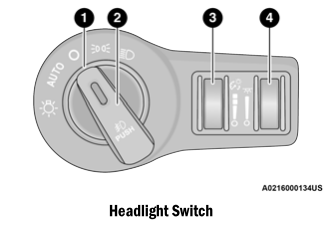
Headlight Switch
The headlight switch is located on the left side of the instrument panel. This switch controls the operation of the headlights, parking lights, instrument panel lights, and fog lights (if equipped).