
Dodge Charger: GETTING TO KNOW YOUR VEHICLE / INTERIOR STORAGE AND EQUIPMENT
Dodge Charger 2011-2026 Owner's Manual / GETTING TO KNOW YOUR VEHICLE / INTERIOR STORAGE AND EQUIPMENT
- Storage, Glove Compartment
- Door Storage, Console Features
- Sunglasses Bin Door
- USB/AUX Control
- Illuminated Cupholders — If Equipped
- Power Outlets
 Operating Tips
NOTE:
Refer to the chart at the end of this section for suggested control settings
for various weather conditions.
Summer Operation
The engine cooling system must be protected with a high-quality antifreeze coolant
to provide proper corrosion protection and to protect against engine overheating...
 Storage, Glove Compartment
The glove compartment is located on the passenger side of the instrument panel.
To open the glove compartment, pull the release handle.
WARNING!
Do not operate this vehicle with a glove compartment in the open position...
Other information:
Dodge Charger 2011-2026 Owner's Manual: Event Data Recorder (EDR)
This vehicle is equipped with an event data recorder (EDR). The main purpose of an EDR is to record, in certain crash or near crash-like situations, such as an air bag deployment or hitting a road obstacle, data that will assist in understanding how a vehicle’s systems performed...
Dodge Charger 2011-2026 Owner's Manual: Before You Begin Programming HomeLink®, Erasing All The HomeLink® Channels
Before You Begin Programming HomeLink® For efficient programming and accurate transmission of the radio-frequency signal, it is recommended that a new battery be placed in the hand-held transmitter of the device that is being programmed to the HomeLink® system...
Categories
- Manuals Home
- Dodge Charger Owners Manual
- Dodge Charger Service Manual
- Keyless Enter-N-Go — Passive Entry
- Headlight Switch
- Jump Starting Procedure
- New on site
- Most important about car
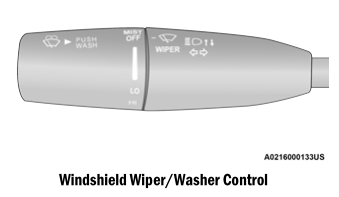
WINDSHIELD WIPERS AND WASHERS
The windshield wiper/washer controls are located on the multifunction lever on the left side of the steering column. The front wipers are operated by rotating a switch, located on the end of the lever.

Copyright © 2026 www.docharger.org