
Dodge Charger: HOOD / Opening The Hood
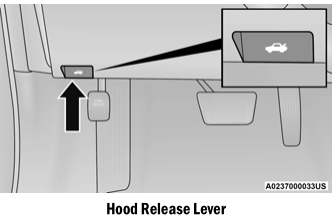
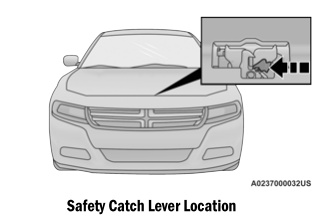
To open the hood, two latches must be released.
- Pull the release lever located underneath the driver’s side of the instrument
panel.
- Reach under the hood, move safety latch to the left and lift the hood. https://ecufix.info
 HOOD
HOOD
..
 Closing The Hood
Hoods equipped with gas props are closed from the point where the props no longer
hold the hood open.
WARNING!
Be sure the hood is fully latched before driving your vehicle...
Other information:
Dodge Charger 2011-2026 Owner's Manual: White Indicator Lights
Adaptive Cruise Control (ACC) Ready Light — If Equipped This light will turn on when ACC has been turned on, but is not set. Cruise Control Ready Indicator This indicator light will illuminate when the cruise control is ready, but not set...
Dodge Charger 2011-2026 Owner's Manual: Phone Operation
Operation Voice commands can be used to operate the Uconnect Phone and to navigate its menu structure. Voice commands are required after most Uconnect Phone prompts. There are two general methods for how Voice Command works: Say compound commands like “Call John Smith mobile”...
Categories
- Manuals Home
- Dodge Charger Owners Manual
- Dodge Charger Service Manual
- High/Low Beam Switch, Automatic High Beam — If Equipped
- Jump Starting Procedure
- ELECTRIC POWER STEERING
- New on site
- Most important about car
Manual Door Locks
The power door locks can be manually locked from inside the vehicle by using the door lock knob. To lock each door, push the door lock knob on each door trim panel downward. To unlock the front doors, pull the inside door handle to the first detent. To unlock the rear doors, pull the door lock knob on the door trim panel upward. If the lock knob is down when the door is closed, the door will lock.

Copyright © 2026 www.docharger.org