
Dodge Charger: JACKING AND TIRE CHANGING / Preparations For Jacking
Dodge Charger 2011-2026 Owner's Manual / IN CASE OF EMERGENCY / JACKING AND TIRE CHANGING / Preparations For Jacking
- Park the vehicle on a firm, level surface as far from the edge of the roadway
as possible. Avoid icy or slippery areas.
WARNING!
Do not attempt to change a tire on the side of the vehicle close to moving traffic. Pull far enough off the road to avoid being hit when operating the jack or changing the wheel.
- Turn on the Hazard Warning Flashers.
- Apply the parking brake.
- Place the gear selector into PARK (P).
- Turn off the ignition.
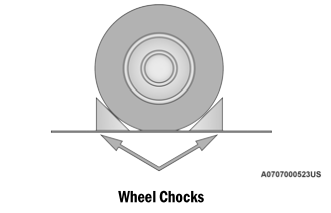
- Block both the front and rear of the wheels diagonally opposite of the jacking position using the provided wheel chocks. For example, if changing the driver’s front wheel, chock the passenger’s rear wheel. Place both chocks under the tires.
NOTE:
Passengers should not remain in the vehicle when the vehicle is being lifted or raised.
 JACKING AND TIRE CHANGING
WARNING!
Do not attempt to change a tire on the side of the vehicle close to
moving traffic. Pull far enough off the road to avoid the danger of being hit
when operating the jack or changing the wheel...
 Jack Location/Spare Tire Stowage
The jack and spare tire are both stowed under an access cover in the trunk. Follow
these steps to access the jack and spare tire.
NOTE:
The spare tire must be removed in order to access the jack...
Other information:
Dodge Charger 2011-2026 Owner's Manual: Supplemental Side Air Bags
Supplemental Seat-Mounted Side Air Bags (SABs) This vehicle is equipped with Supplemental Seat-Mounted Side Air Bags (SABs). Supplemental Seat-Mounted Side Air Bags (SABs) are located in the outboard side of the front seats. The SABs are marked with “SRS AIRBAG” or “AIRBAG” on a label or on the seat trim on the outboard side of the seats...
Dodge Charger 2011-2026 Owner's Manual: Reactive Head Restraints — Front Seats
The front driver and passenger seats are equipped with Reactive Head Restraints (RHR). In the event of a rear impact, the RHR will automatically extend forward minimizing the gap between the back of the occupant’s head and the RHR. The RHR will automatically return to their normal position following a rear impact...
Categories
- Manuals Home
- Dodge Charger Owners Manual
- Dodge Charger Service Manual
- Jump Starting Procedure
- High/Low Beam Switch, Automatic High Beam — If Equipped
- Service Tire Pressure System Warning
- New on site
- Most important about car
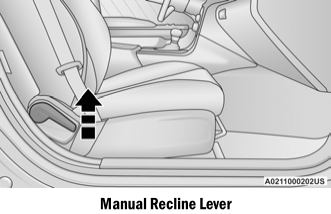
Manual Front Seat Recline
To adjust the seatback, lift the lever located on the outboard side of the seat, lean back to the desired position and release the lever. To return the seatback, lift the lever, lean forward and release the lever.

Copyright © 2026 www.docharger.org