
Dodge Charger: VEHICLE SECURITY SYSTEM (IF EQUIPPED) / To Arm The System
Dodge Charger 2011-2026 Owner's Manual / GETTING TO KNOW YOUR VEHICLE / VEHICLE SECURITY SYSTEM (IF EQUIPPED) / To Arm The System
- Follow these steps to arm the Vehicle Security system:
- Make sure the vehicle’s ignition is placed in the OFF position.
- Perform one of the following methods to lock the vehicle:
- Push lock on the interior power door lock switch with the driver and/or passenger door open.
- Push the lock button on the exterior Passive Entry door handle with a valid key fob available in the same exterior zone.
- Push the lock button on the key fob.
- If any doors are open, close them.
 VEHICLE SECURITY SYSTEM (IF EQUIPPED)
The Vehicle Security system monitors the vehicle doors, hood, trunk, and the
Keyless Enter-N-Go Ignition for unauthorized operation. While the Vehicle Security
system is armed, interior switches for door locks and trunk release are disabled...
 To Disarm The System
The Vehicle Security system can be disarmed using any of the following methods:
Push the unlock button on the key fob.
Grab the Passive Entry door handle to unlock the door...
Other information:
Dodge Charger 2011-2026 Owner's Manual: Keyless Enter-N-Go — Passive Entry
The Passive Entry system is an enhancement to the vehicle’s key fob and a feature of Keyless Enter-N-Go — Passive Entry. This feature allows you to lock and unlock the vehicle’s door(s) without having to push the key fob lock or unlock buttons...
Dodge Charger 2011-2026 Owner's Manual: Jack Location/Spare Tire Stowage
The jack and spare tire are both stowed under an access cover in the trunk. Follow these steps to access the jack and spare tire. NOTE: The spare tire must be removed in order to access the jack. Open the trunk. Lift the access cover using the pull strap...
Categories
- Manuals Home
- Dodge Charger Owners Manual
- Dodge Charger Service Manual
- To Lock/Unlock The Doors And Trunk
- USB/AUX Control
- Dimmer Controls
- New on site
- Most important about car
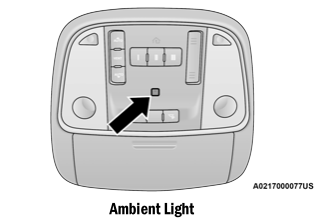
Ambient Light — If Equipped
The overhead console is equipped with an ambient light feature. This light illuminates for improved visibility of the floor and center console area.

Copyright © 2026 www.docharger.org