
Dodge Charger: ANDROID AUTO™ & APPLE CARPLAY® — IF EQUIPPED / Music and Communication
Music
 Android Auto™ allows you to access,
stream, and play your favorite music with apps like Google Play Music, iHeartRadio,
Spotify, and any audio playable application. Using your smartphone’s data plan,
you can stream endless music on the road.
Android Auto™ allows you to access,
stream, and play your favorite music with apps like Google Play Music, iHeartRadio,
Spotify, and any audio playable application. Using your smartphone’s data plan,
you can stream endless music on the road.
NOTE:
Music apps, playlists, and stations must be set up on your smartphone prior to using Android Auto™ for them to work with Android Auto™.
NOTE:
To see the track details for the music playing through Android Auto™, select the Uconnect system’s media screen.
For further information, refer to https:// support.google.com/androidauto.
Communication
 With Android Auto™ connected, push
and hold the VR button on the steering wheel to activate voice recognition specific
to Android Auto™. This allows you to send and reply to text messages, have incoming
text messages read out loud, and place and receive hands-free calls.
With Android Auto™ connected, push
and hold the VR button on the steering wheel to activate voice recognition specific
to Android Auto™. This allows you to send and reply to text messages, have incoming
text messages read out loud, and place and receive hands-free calls.
 Maps
Maps
Push and hold the Voice Recognition
(VR) button on the steering wheel until the beep or tap the Microphone icon to ask
Google to take you to a desired destination by voice...
 Apps, Android Auto™ Voice Command
Apps
The Android Auto™ App displays all the compatible apps that are available to
use with Android Auto™, every time it is launched. You must have the compatible
app downloaded, and you must be signed in to the app through your mobile device
for it to work with Android Auto™...
Other information:
Dodge Charger 2011-2026 Owner's Manual: Manual Adjustment (Rear Seats)
WARNING! Do not pile luggage or cargo higher than the top of the seatback. This could impair visibility or become a dangerous projectile in a sudden stop or collision. Folding Rear Seat The rear seatbacks can be folded forward to provide an additional storage area...
Dodge Charger 2011-2026 Owner's Manual: PUBLICATION ORDER FORMS
To order the following manuals, you may use either the website or the phone numbers listed below. Service Manuals These comprehensive Service Manuals provide a complete working knowledge of the vehicle, system, and/or components and is written in straightforward language with illustrations, diagrams, and charts...
Categories
- Manuals Home
- Dodge Charger Owners Manual
- Dodge Charger Service Manual
- PARKING BRAKE
- Service Tire Pressure System Warning
- To Lock/Unlock The Doors And Trunk
- New on site
- Most important about car
Storage, Glove Compartment
The glove compartment is located on the passenger side of the instrument panel.
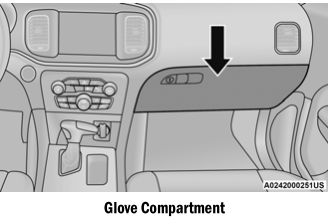
To open the glove compartment, pull the release handle.
WARNING!
Do not operate this vehicle with a glove compartment in the open position. Driving with the glove compartment open may result in injury in a collision.
