
Dodge Charger: PARKSENSE REAR PARK ASSIST — IF EQUIPPED / ParkSense Display
The warning display will turn on indicating the system status when the vehicle is in REVERSE and an obstacle has been detected.
The system will indicate a detected obstacle by showing a single arc in the left and/or right front or rear regions based on the object’s distance and location relative to the vehicle.
https://ecufix.infoIf an object is detected in the left and/or right rear region, the display will show a single arc in the left and/or right rear region and the system will produce a tone. As the vehicle moves closer to the object, the display will show the single arc moving closer to the vehicle and the tone will change from a single 1/2 second tone to slow, to fast, to continuous.
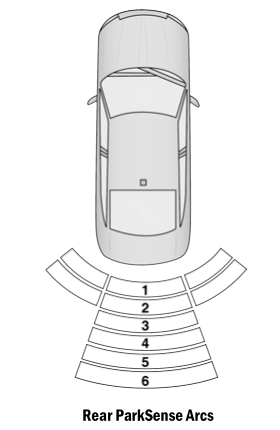
- Continuous Tone/Flashing Arc
- Fast Tone/Flashing Arc
- Fast Tone/Flashing Arc
- Slow Tone/Solid Arc
- Slow Tone/Solid Arc
- Single 1/2 Second Tone/Solid Arc
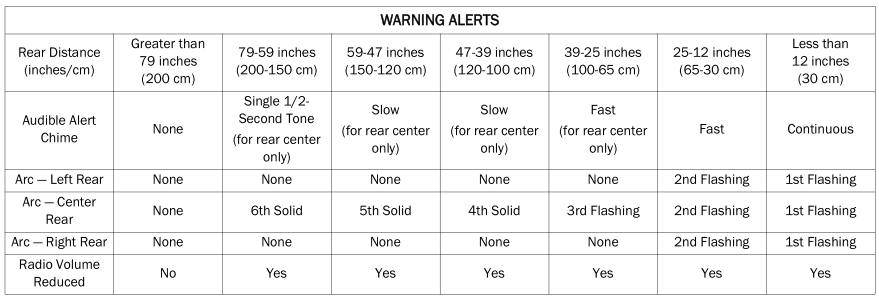
The vehicle is close to the obstacle when the instrument cluster display shows one flashing arc and sounds a continuous tone. The following chart shows the warning alert operation when the system is detecting an obstacle:
NOTE:
ParkSense will reduce the volume of the radio, if on, when the system is sounding an audio tone.
Adjustable Chime Volume Settings
Rear chime volume settings can be selected from the Uconnect system.
The chime volume settings include low, medium, and high.
ParkSense will retain its last known configuration state through ignition cycles.
 ParkSense Sensors
The four ParkSense sensors, located in the rear fascia/bumper, monitor the area
behind the vehicle that is within the sensors’ field of view. The sensors can detect
obstacles from approximately 12 inches (30 cm) up to 79 inches (200 cm) from the
rear fascia/ bumper...
 ParkSense Warning Display, Enabling And Disabling ParkSense
ParkSense Warning Display
The ParkSense Warning screen will only be displayed if Sound and Display is selected
from within the Uconnect system.
The ParkSense Warning screen is located within the instrument cluster display...
Other information:
Dodge Charger 2011-2026 Owner's Manual: Head Restraints
Head restraints are designed to reduce the risk of injury by restricting head movement in the event of a rear impact. Head restraints should be adjusted so that the top of the head restraint is located above the top of your ear. WARNING! All occupants, including the driver, should not operate a vehicle or sit in a vehicle’s seat until the head restraints are placed in their proper positions in order to minimize the risk of neck injury in the event of a crash...
Dodge Charger 2011-2026 Owner's Manual: LaneSense Warning Message
The LaneSense system will indicate the current lane drift condition through the instrument cluster display. Premium Instrument Cluster Display When the LaneSense system is on, the lane lines are gray when both of the lane boundaries have not been detected and the LaneSense telltale is solid white...
Categories
- Manuals Home
- Dodge Charger Owners Manual
- Dodge Charger Service Manual
- Launch Control
- Sport Mode
- SCHEDULED SERVICING
- New on site
- Most important about car
Manual Door Locks
The power door locks can be manually locked from inside the vehicle by using the door lock knob. To lock each door, push the door lock knob on each door trim panel downward. To unlock the front doors, pull the inside door handle to the first detent. To unlock the rear doors, pull the door lock knob on the door trim panel upward. If the lock knob is down when the door is closed, the door will lock.
