Dodge Charger: PARKSENSE REAR PARK ASSIST — IF EQUIPPED / ParkSense Warning Display, Enabling And Disabling ParkSense
ParkSense Warning Display
The ParkSense Warning screen will only be displayed if Sound and Display is selected from within the Uconnect system.
The ParkSense Warning screen is located within the instrument cluster display. It provides visual warnings to indicate the distance between the rear fascia/bumper and the detected obstacle.
https://ecufix.infoEnabling And Disabling ParkSense
 ParkSense can be enabled and disabled
with the ParkSense switch.
ParkSense can be enabled and disabled
with the ParkSense switch.
When the ParkSense switch is pushed to disable the system, the instrument cluster will display the “ParkSense Off” message for approximately five seconds. When the gear selector is moved to REVERSE and the system is disabled, the instrument cluster display will display the “ParkSense Off” message for as long as the vehicle is in REVERSE.
The ParkSense switch LED will be on when ParkSense is disabled or requires service. The ParkSense switch LED will be off when the system is enabled. If the ParkSense switch is pushed and the system requires service, the ParkSense switch LED will blink momentarily and then the LED will be on.
 ParkSense Display
The warning display will turn on indicating the system status when the vehicle
is in REVERSE and an obstacle has been detected.
The system will indicate a detected obstacle by showing a single arc in the left
and/or right front or rear regions based on the object’s distance and location relative
to the vehicle...
 Service The ParkSense Park Assist System
During vehicle start up, when the ParkSense Rear Park Assist System has detected
a faulted condition, the instrument cluster display will actuate a single chime,
once per ignition cycle, and it will display the “PARKSENSE UNAVAILABLE WIPE REAR
SENSORS” or the “PARKSENSE UNAVAILABLE SERVICE REQUIRED” message...
Other information:
Dodge Charger 2011-2026 Owner's Manual: To Unlock/Enter The Trunk
With a valid Passive Entry key fob within 5 ft (1.5 m) of the deck lid, push the button located on the right side of the deck lid. NOTE: If you inadvertently leave your vehicle's Passive Entry key fob in the trunk and try to close the deck lid, the deck lid will automatically unlatch, unless another one of the vehicle’s Passive Entry key fobs is outside the vehicle and within 5 ft (1...
Dodge Charger 2011-2026 Owner's Manual: Frequency Operated Button Integrated Key (FOBIK-Safe)
To minimize the possibility of unintentionally locking a Passive Entry key fob inside your vehicle, the Passive Entry system is equipped with an automatic door unlock feature which will function if the ignition switch is in the OFF position. The following situations will trigger a FOBIK-Safe search in any passive entry vehicle: A lock request is made by a valid Passive Entry key fob while a door is open...
Categories
- Manuals Home
- Dodge Charger Owners Manual
- Dodge Charger Service Manual
- ELECTRIC POWER STEERING
- Service Tire Pressure System Warning
- To Disarm The System
- New on site
- Most important about car
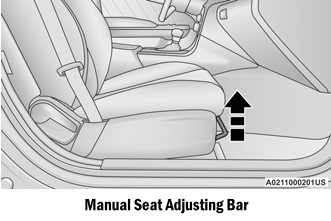
Manual Front Seat Forward/Rearward Adjustment
Some models may be equipped with a manual front passenger seat. The seat can be adjusted forward or rearward by using a bar located by the front of the seat cushion, near the floor.