Dodge Charger: Tires — General Information / Run Flat Tires — If Equipped
Run Flat tires allow you the capability to drive 50 miles (80 km) at 50 mph (80 km/h) after a rapid loss of inflation pressure. This rapid loss of inflation is referred to as the Run Flat mode. A Run Flat mode occurs when the tire inflation pressure is of/or below 14 psi (96 kPa). Once a Run Flat tire reaches the Run Flat mode it has limited driving capabilities and needs to be replaced immediately. A Run Flat tire is not repairable. When a Run Flat tire is changed after driving with underinflated tire condition, please replace the TPM sensor as it is not designed to be reused when driven under Run Flat mode 14 psi (96 kPa) condition.
https://ecufix.infoNOTE:
TPM Sensor must be replaced after driving the vehicle on a flat tire condition.
It is not recommended driving a vehicle loaded at full capacity or to tow a trailer while a tire is in the Run Flat mode.
See the tire pressure monitoring section for more information.
 Radial Ply Tires
WARNING!
Combining radial ply tires with other types of tires on your vehicle will
cause your vehicle to handle poorly. The instability could cause a collision...
 Tire Spinning
When stuck in mud, sand, snow, or ice conditions, do not spin your vehicle's
wheels above 30 mph (48 km/h) or for longer than 30 seconds continuously without
stopping...
Other information:
Dodge Charger 2011-2026 Owner's Manual: PERFORMANCE PAGES
Performance Pages is an application that provides a display for performance indicators, as received from the instrument cluster, that will help you gain familiarity with the capabilities of your vehicle in real-time. To access the Performance Pages, press the Apps button on the touchscreen then press the Performance Pages button on the touchscreen...
Dodge Charger 2011-2026 Owner's Manual: Tire Pressure
Proper tire inflation pressure is essential to the safe and satisfactory operation of your vehicle. Four primary areas are affected by improper tire pressure: Safety Fuel Economy Tread Wear Ride Comfort and Vehicle Stability Safety WARNING! Improperly inflated tires are dangerous and can cause collisions...
Categories
- Manuals Home
- Dodge Charger Owners Manual
- Dodge Charger Service Manual
- High/Low Beam Switch, Automatic High Beam — If Equipped
- USB/AUX Control
- WHEEL AND TIRE TORQUE SPECIFICATIONS
- New on site
- Most important about car
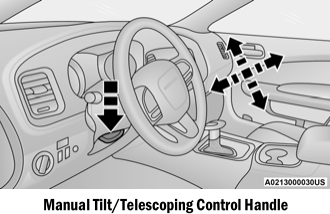
Manual Tilt/Telescoping Steering Column — If Equipped
This feature allows you to tilt the steering column upward or downward. It also allows you to lengthen or shorten the steering column. The tilt/telescoping control is located below the steering wheel at the end of the steering column.