Dodge Charger: Manual Climate Control Descriptions And Functions / SYNC Button, Blower Control
SYNC Button
 Press the SYNC button on the touchscreen
to toggle the SYNC feature on/off. The SYNC indicator illuminates when SYNC is on.
SYNC synchronizes the passenger temperature setting with the driver temperature
setting. Changing the passenger’s temperature setting while in SYNC will automatically
exit this feature.
Press the SYNC button on the touchscreen
to toggle the SYNC feature on/off. The SYNC indicator illuminates when SYNC is on.
SYNC synchronizes the passenger temperature setting with the driver temperature
setting. Changing the passenger’s temperature setting while in SYNC will automatically
exit this feature.
NOTE:
The SYNC button is only available on the touch- screen.
Blower Control
 Blower Control regulates the amount
of air forced through the Climate Control system. There are seven blower speeds
available. Adjusting the blower will cause automatic mode to switch to manual operation.
The speeds can be selected using either the blower control knob on the faceplate
or the buttons on the touchscreen.
Blower Control regulates the amount
of air forced through the Climate Control system. There are seven blower speeds
available. Adjusting the blower will cause automatic mode to switch to manual operation.
The speeds can be selected using either the blower control knob on the faceplate
or the buttons on the touchscreen.
Faceplate
The blower speed increases as you turn the blower control knob clockwise from the lowest blower setting. The blower speed decreases as you turn the blower control knob counterclockwise.
Touchscreen
Use the small blower icon to reduce the blower setting and the large blower icon to increase the blower setting. Blower can also be selected by pressing the blower bar area between the icons.
 Driver And Passenger Temperature Control Buttons
These buttons provide the driver and passenger with independent temperature control.
Push the red button on the faceplate
or touchscreen or press and slide the temperature bar towards the red arrow button
on the touchscreen for warmer temperature settings...
 Mode Control, Panel Mode, Bi-Level Mode, Floor Mode, Mix Mode, Climate Control
OFF Button
Mode Control, Panel Mode, Bi-Level Mode, Floor Mode, Mix Mode, Climate Control
OFF Button
Mode Control
Select Mode by pressing one of the Mode buttons on the touchscreen to change
the airflow distribution mode. The airflow distribution mode can be adjusted so
air comes from the instrument panel outlets, floor outlets, defrost outlets, and
demist outlets...
Other information:
Dodge Charger 2011-2026 Owner's Manual: Gauges
When selected, this screen displays the following values: Oil TemperatureShows the actual oil temperature. Oil PressureShows the actual oil pressure. Coolant TemperatureShows the actual coolant temperature. Battery VoltageShows actual battery voltage...
Dodge Charger 2011-2026 Owner's Manual: Door Storage, Console Features
Door Storage Large storage areas are built into the door panels for easy access. Console Features Two separate storage compartments are located underneath the center console armrest. Inside the center console armrest, there is a removable upper storage tray that can be slid forward/rearward on rails for access to the lower storage area...
Categories
- Manuals Home
- Dodge Charger Owners Manual
- Dodge Charger Service Manual
- PARKING BRAKE
- Sport Mode
- Keyless Enter-N-Go — Passive Entry
- New on site
- Most important about car
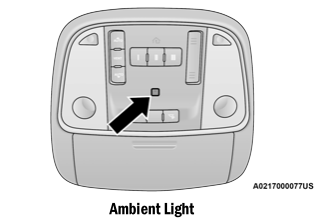
Ambient Light — If Equipped
The overhead console is equipped with an ambient light feature. This light illuminates for improved visibility of the floor and center console area.