
Dodge Charger: GETTING TO KNOW YOUR VEHICLE / CLIMATE CONTROLS
Dodge Charger 2011-2026 Owner's Manual / GETTING TO KNOW YOUR VEHICLE / CLIMATE CONTROLS
The Climate Control system allows you to regulate the temperature, air flow, and direction of air circulating throughout the vehicle. The controls are located on the touchscreen (if equipped) and on the instrument panel below the radio.
- Automatic Climate Control Descriptions And Functions
- Manual Climate Control Descriptions And Functions
- Automatic Temperature Control (ATC)
- Climate Voice Commands
- Operating Tips
 Rain Sensing Wipers — If Equipped
This feature senses rain or snowfall on the windshield and automatically activates
the wipers. Rotate the end of the multifunction lever to one of four detent positions
to activate this feature...

Other information:
Dodge Charger 2011-2026 Owner's Manual: Installing A Child Restraint With A Switchable Automatic Locking Retractor (ALR):
Child restraint systems are designed to be secured in vehicle seats by lap belts or the lap belt portion of a lap/shoulder belt. WARNING! Improper installation or failure to properly secure a child restraint can lead to failure of the restraint...
Dodge Charger 2011-2026 Owner's Manual: Battery Saver On/Battery Saver Mode Message — Electrical Load Reduction Actions — If Equipped
This vehicle is equipped with an Intelligent Battery Sensor (IBS) to perform additional monitoring of the electrical system and status of the vehicle battery. In cases when the IBS detects charging system failure, or the vehicle battery conditions are deteriorating, electrical load reduction actions will take place to extend the driving time and distance of the vehicle...
Categories
- Manuals Home
- Dodge Charger Owners Manual
- Dodge Charger Service Manual
- SERVICING AND MAINTENANCE
- Opening And Closing The Trunk
- Service Tire Pressure System Warning
- New on site
- Most important about car
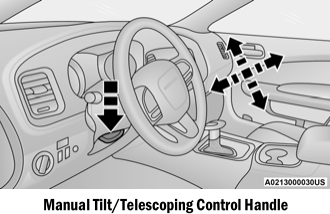
Manual Tilt/Telescoping Steering Column — If Equipped
This feature allows you to tilt the steering column upward or downward. It also allows you to lengthen or shorten the steering column. The tilt/telescoping control is located below the steering wheel at the end of the steering column.

Copyright © 2026 www.docharger.org