
Dodge Charger: SERVICING AND MAINTENANCE / BODYWORK
 STORING THE VEHICLE
If you are leaving your vehicle dormant for more than 3 weeks, you may want to
take these steps to protect your battery.
Disconnect the negative cable from the battery...
 Protection From Atmospheric Agents
Vehicle body care requirements vary according to geographic locations and usage.
Chemicals that make roads passable in snow and ice and those that are sprayed on
trees and road surfaces during other seasons are highly corrosive to the metal in
your vehicle...
Other information:
Dodge Charger 2011-2026 Owner's Manual: Illuminated Vanity Mirrors
To access an illuminated vanity mirror, flip down one of the visors and lift the cover. Sun Visor “Slide-On-Rod” Feature — If Equipped The sun visor “Slide-On-Rod” feature allows for additional flexibility in positioning the sun visor to block out the sun...
Dodge Charger 2011-2026 Owner's Manual: Manual Door Locks
The power door locks can be manually locked from inside the vehicle by using the door lock knob. To lock each door, push the door lock knob on each door trim panel downward. To unlock the front doors, pull the inside door handle to the first detent...
Categories
- Manuals Home
- Dodge Charger Owners Manual
- Dodge Charger Service Manual
- ELECTRIC POWER STEERING
- Power Adjustment (Front Seats) — If Equipped
- Jump Starting Procedure
- New on site
- Most important about car
Storage, Glove Compartment
The glove compartment is located on the passenger side of the instrument panel.
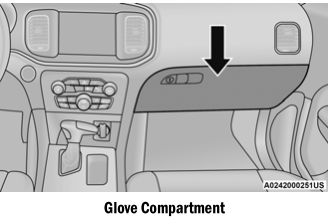
To open the glove compartment, pull the release handle.
WARNING!
Do not operate this vehicle with a glove compartment in the open position. Driving with the glove compartment open may result in injury in a collision.

Copyright © 2026 www.docharger.org