
Dodge Charger: Programming HomeLink® To A Garage Door Opener / Non-Rolling Code Garage Door Opener Final Steps
Dodge Charger 2011-2026 Owner's Manual / GETTING TO KNOW YOUR VEHICLE / UNIVERSAL GARAGE DOOR OPENER (HOMELINK®) / Programming HomeLink® To A Garage Door Opener / Non-Rolling Code Garage Door Opener Final Steps
- Push and hold the programmed HomeLink® button and observe the HomeLink® indicator light. If the HomeLink® indicator light stays on constantly, programming is complete.
- Push the programmed HomeLink® button to confirm that the garage door opener motor operates. If the garage door opener motor does not operate, repeat the steps from the beginning.
WARNING!
- Your motorized door or gate will open and close while you are programming the universal transceiver. Do not program the transceiver if people or pets are in the path of the door or gate.
- Do not run your vehicle in a closed garage or confined area while programming the transceiver. Exhaust gas from your vehicle contains Carbon Monoxide (CO) which is odorless and colorless. Carbon Monoxide is poisonous when inhaled and can cause you and others to be severely injured or killed.
 Rolling Code Garage Door Opener Final Steps
NOTE:
You have 30 seconds in which to initiate rolling code final step 2, after completing
rolling code final step 1.
At the garage door opener motor (in the garage), locate the “LEARN” or “TRAIN”
button...
 Programming HomeLink® To A Miscellaneous Device, Reprogramming A Single HomeLink®
Button
Programming HomeLink® To A Miscellaneous Device, Reprogramming A Single HomeLink®
Button
Programming HomeLink® To A Miscellaneous Device
Follow the procedure on programming HomeLink® to a garage door opener. Be sure
to determine if the device has a rolling code, or non-rolling code before beginning
the programming process...
Other information:
Dodge Charger 2011-2026 Owner's Manual: Tire Rotation Recommendations
Tires on the front and rear axles of vehicles operate at different loads and perform different steering, driving, and braking functions. For these reasons, they wear at unequal rates. These effects can be reduced by timely rotation of tires. The benefits of rotation are especially worthwhile with aggressive tread designs such as those on all season type tires...
Dodge Charger 2011-2026 Owner's Manual: Children Too Large For Booster Seats
Children who are large enough to wear the shoulder belt comfortably, and whose legs are long enough to bend over the front of the seat when their back is against the seatback, should use the seat belt in a rear seat. Use this simple 5-step test to decide whether the child can use the vehicle’s seat belt alone: Can the child sit all the way back against the back of the vehicle seat? Do the child’s knees bend comfortably over the front of the vehicle seat – while the child is still sitting all the way back? Does the shoulder belt cross the child’s shoulder between the neck and arm? Is the lap part of the belt as low as possible, touching the child’s thighs and not the stomach? Can the child stay seated like this for the whole trip? If the answer to any of these questions was “no,” then the child still needs to use a booster seat in this vehicle...
Categories
- Manuals Home
- Dodge Charger Owners Manual
- Dodge Charger Service Manual
- ELECTRIC POWER STEERING
- USB/AUX Control
- Blind Spot Monitoring (BSM) — If Equipped
- New on site
- Most important about car
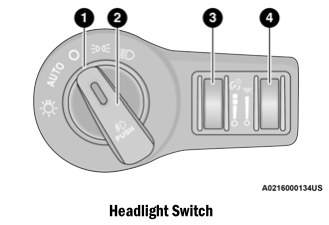
Headlight Switch
The headlight switch is located on the left side of the instrument panel. This switch controls the operation of the headlights, parking lights, instrument panel lights, and fog lights (if equipped).

Copyright © 2026 www.docharger.org