
Dodge Charger: TECHNICAL SPECIFICATIONS
Dodge Charger 2011-2026 Owner's Manual / TECHNICAL SPECIFICATIONS
- VEHICLE IDENTIFICATION NUMBER (VIN)
- BRAKE SYSTEM
- WHEEL AND TIRE TORQUE SPECIFICATIONS
- FUEL REQUIREMENTS
- 3.6L Engine and 5.7L Engine
- Reformulated Gasoline. Materials Added To Fuel
- Gasoline/Oxygenate Blends
- Do Not Use E-85 In Non-Flex Fuel Vehicles
- CNG And LP Fuel System Modifications
- Methylcyclopentadienyl Manganese Tricarbonyl (MMT) In Gasoline
- FLUID CAPACITIES
- ENGINE FLUIDS AND LUBRICANTS
- CHASSIS FLUIDS AND LUBRICANTS
 Glass Surfaces
All glass surfaces should be cleaned on a regular basis with Mopar® Glass Cleaner,
or any commercial household-type glass cleaner. Never use an abrasive type cleaner...
 VEHICLE IDENTIFICATION NUMBER (VIN)
The VIN is on the left front corner of the instrument panel. The VIN is visible
from outside of the vehicle through the windshield.
NOTE:
It is illegal to remove or alter the VIN...
Other information:
Dodge Charger 2011-2026 Owner's Manual: Mode Control, Panel Mode, Bi-Level Mode, Floor Mode, Mix Mode, Climate Control OFF Button
Mode Control Select Mode by pressing one of the Mode buttons on the touchscreen to change the airflow distribution mode. The airflow distribution mode can be adjusted so air comes from the instrument panel outlets, floor outlets, defrost outlets, and demist outlets...
Dodge Charger 2011-2026 Owner's Manual: Dimmer Controls
The brightness of the instrument panel lighting and lighted cupholders (if equipped) can be regulated by rotating the left dimmer control up (brighter) or down (dimmer). When the headlights are on you can supplement the brightness of the instrument cluster display, radio and overhead console by rotating the control to the first detent up until you hear a click...
Categories
- Manuals Home
- Dodge Charger Owners Manual
- Dodge Charger Service Manual
- Keyless Enter-N-Go — Passive Entry
- How To Use Remote Start
- PARKING BRAKE
- New on site
- Most important about car
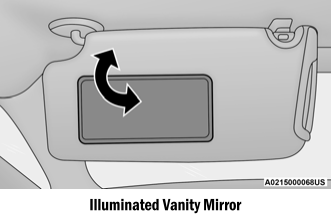
Illuminated Vanity Mirrors
To access an illuminated vanity mirror, flip down one of the visors and lift the cover.
Sun Visor “Slide-On-Rod” Feature — If Equipped
The sun visor “Slide-On-Rod” feature allows for additional flexibility in positioning the sun visor to block out the sun.
Fold down the sun visor. Unclip the visor from the corner clip. Pivot the sun visor toward the side window. Extend the sun visor for additional sun blockage.
Copyright © 2026 www.docharger.org