
Dodge Charger: MULTIMEDIA / UCONNECT MODES
Dodge Charger 2011-2026 Owner's Manual / MULTIMEDIA / UCONNECT MODES
- Steering Wheel Audio Controls
- Radio Mode
- SiriusXM® Satellite Radio Mode — If Equipped
- Setting Presets
- Audio Settings
- Media Mode
- Phone Mode. Overview
- Phone Operation
- Phone Call Features
- Advanced Phone Connectivity
- Things You Should Know About Uconnect Phone
 Safety And General Information
Safety Guidelines
WARNING!
ALWAYS drive safely with your hands on the steering wheel. You have full
responsibility and assume all risks related to the use of the Uconnect features
and applications in this vehicle...
 Steering Wheel Audio Controls
The remote sound system controls are located on the rear surface of the steering
wheel at the three and nine o’clock positions.
The right-hand control is a rocker-type switch with a push button in the center
and controls the volume and mode of the sound system...
Other information:
Dodge Charger 2011-2026 Owner's Manual: Gear Ranges
Do not press the accelerator pedal when shifting out of PARK (P) or NEUTRAL (N). NOTE: After selecting any gear range, wait a moment to allow the selected gear to engage before accelerating. This is especially important when the engine is cold. PARK (P) This range supplements the parking brake by locking the transmission...
Dodge Charger 2011-2026 Owner's Manual: Interior Courtesy Lights, Front Map/Reading Lights
Interior Courtesy Lights The courtesy lights can be turned on by pushing the top corner of the lens. To turn the lights off, push the lens a second time. Front Map/Reading Lights The front map/reading lights are mounted in the overhead console...
Categories
- Manuals Home
- Dodge Charger Owners Manual
- Dodge Charger Service Manual
- High/Low Beam Switch, Automatic High Beam — If Equipped
- ELECTRIC POWER STEERING
- Keyless Enter-N-Go — Passive Entry
- New on site
- Most important about car
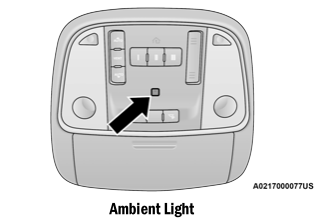
Ambient Light — If Equipped
The overhead console is equipped with an ambient light feature. This light illuminates for improved visibility of the floor and center console area.

Copyright © 2026 www.docharger.org